
Download Linkquire – AI YouTube Summarizer & Question‑Answering Tool
Overview
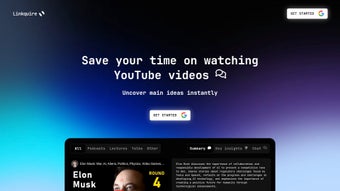
Linkquire is a cutting‑edge AI‑driven application designed to turn lengthy YouTube videos into concise, readable summaries while also allowing users to pose specific questions about the video content. By simply pasting a YouTube URL into the web‑based interface, Linkquire parses the audio, extracts the transcript, and then employs large‑language‑model techniques to generate a clear, bullet‑point summary that captures the main ideas, arguments, and take‑aways. The tool works with videos of any length, supports every language for transcription, and returns insights in English, making it a versatile companion for students, researchers, marketers, and casual viewers who need quick access to the essence of a video without spending time watching it in full.
In addition to summarization, Linkquire’s question‑answering feature lets users type natural‑language queries—such as “What is the main argument in the introduction?” or “Which statistics were mentioned about market growth?”—and receive direct, AI‑generated answers pulled from the video’s context. This dual capability not only saves time but also enhances comprehension, especially when dealing with technical tutorials, conference talks, or multilingual content where a quick recap is essential. Linkquire positions itself as a secure, free‑to‑try solution that respects user privacy; the video URL is processed on the server, and no personal data is stored beyond the session.
Regular updates improve transcription accuracy and expand the range of supported video formats, ensuring that the tool remains relevant in a fast‑evolving digital landscape.
Key Features, Benefits & System Compatibility
- AI‑Powered Summarization: Generates concise, human‑readable summaries for videos of any duration.
- Interactive Question‑Answering: Users can ask natural‑language questions and receive answers directly sourced from the video.
- Multi‑Language Transcription: Supports transcription of videos in any language, with English‑only output for consistency.
- One‑Click URL Input: Paste a YouTube link and receive results in seconds—no account required.
- Secure Processing: Video URLs are processed temporarily; no personal data is retained after the session.
- Responsive Web Interface: Optimized for desktop, tablet, and mobile browsers.
- Free Tier with Optional Premium Upgrade: Unlimited summaries on the free plan; faster processing and batch uploads on paid plans.
Why Users Choose Linkquire
The primary benefit of Linkquire is time efficiency. Professionals who must review multiple webinars, product demos, or academic lectures can now skim the essential points in minutes rather than hours. Students preparing for exams find the tool invaluable for extracting key concepts from lecture recordings, allowing them to focus study time on deeper analysis.
Marketers and content creators use Linkquire to quickly assess competitor videos, capture trends, and repurpose insights for blog posts or social media snippets. Because the AI works directly with the video’s transcript, answers are contextually accurate, reducing the risk of misinterpretation that often occurs with generic search‑engine snippets. Additionally, the multilingual transcription layer makes Linkquire a global solution—users can upload a French tutorial, obtain an English summary, and still ask detailed questions about the original content.
The free tier removes barriers to entry, while the premium tier offers batch processing for agencies handling dozens of videos daily.
Compatibility: Linkquire is a cloud‑based web application, meaning it runs on any modern browser that supports JavaScript and HTML5. It is fully compatible with Windows 10/11, macOS Catalina and later, Linux distributions (Ubuntu, Fedora, etc.), as well as mobile browsers on Android 8.0+ and iOS 13+. No additional downloads or installations are required, which simplifies deployment across teams with mixed operating systems.
Installation, Setup & How to Use Linkquire Effectively
Because Linkquire is delivered as a SaaS platform, the installation process is reduced to a few straightforward steps. First, navigate to the official website (https://www.linkquire.com) using a supported browser. No registration is mandatory for the free version; however, creating an account unlocks history tracking and premium features. After landing on the homepage, you will see a clean input field labeled “Paste YouTube URL.” Copy the desired video’s link from the address bar and paste it into this field. Click the “Generate Summary” button, and the platform begins processing the video in the background.
While the AI works, you can monitor progress via a progress bar that indicates transcription, analysis, and summary generation stages. Once complete, a scrollable pane displays the summary, segmented into sections such as Introduction, Main Points, and Conclusion. Below the summary, a text box invites you to type questions. For example, typing “What were the three main challenges mentioned?” will trigger the AI to locate the relevant segment in the transcript and return a concise answer. Answers are highlighted and linked to timestamps, allowing you to jump directly to the source moment in the original video if deeper verification is needed.
For power users, Linkquire offers an API key (available on the dashboard after upgrading) that can be integrated into internal tools, LMS platforms, or automation scripts. The API follows REST conventions: a POST request to https://api.linkquire.com/v1/summarize with JSON payload { "url": "https://youtube.com/watch?v=xyz" } returns a JSON object containing summary and answers fields. Rate limits are generous on the free tier (10 requests per hour) and expand substantially on paid plans.
Tips for optimal results: choose videos with clear audio, as background noise can affect transcription accuracy. If the video contains on‑screen text or slides, consider enabling the “Include OCR” option (available in the premium tier) to capture visual information. Finally, for non‑English content, ensure the auto‑detect language option is active; the system will still output English summaries but will base them on a precise transcription of the original language.
Pros, Cons & Detailed Review
Pros
- Instant, high‑quality summaries for any length video.
- Natural‑language question answering directly from video content.
- Supports all YouTube languages for transcription.
- No software download; works in any modern browser.
- Free tier available with generous limits.
- API access for developers and enterprises.
Cons
- Answers are currently provided only in English, even for non‑English videos.
- Highly dependent on internet connection and YouTube’s availability.
- Free tier limits may be restrictive for heavy users.
- Complex technical videos sometimes produce less precise summaries.
Linkquire delivers on its promise of turning long YouTube videos into digestible nuggets of information. The AI summarizer is impressively accurate for most educational and business content, and the question‑answering feature feels like a personal research assistant. While the English‑only output can be limiting for multilingual audiences, the overall value—especially the free tier—makes it a must‑try for anyone looking to streamline video consumption. The only drawbacks are occasional latency on slower connections and the need for a premium upgrade for batch processing, but these are minor trade‑offs for the time saved.
Frequently Asked Questions
Is Linkquire completely free to use?
Linkquire offers a robust free tier that allows unlimited summaries, but it limits the number of requests per hour and does not include batch processing or OCR for slide‑based videos. A paid subscription unlocks higher limits, faster processing, and additional premium features.
Can I summarize videos that are not on YouTube?
Currently, Linkquire only accepts URLs from YouTube. The development roadmap includes support for Vimeo, Dailymotion, and self‑hosted MP4 files in future updates.
How accurate are the transcriptions for non‑English videos?
Transcription accuracy is high for most major languages, leveraging YouTube’s built‑in captions when available. However, the final summary and answers are always rendered in English, which may introduce minor translation nuances.
Is my data safe when I paste a video link?
Yes. Linkquire processes the URL temporarily and does not store any personal information after the session ends. All communications are encrypted via HTTPS.
How do I access the API for automated summarization?
After upgrading to a paid plan, you can generate an API key from your dashboard. The API follows standard REST conventions; detailed documentation is available on the Linkquire developer portal.
Conclusion & Call to Action
In a world saturated with video content, Linkquire stands out as a practical, AI‑enhanced tool that transforms hours of footage into bite‑size knowledge. Whether you’re a student racing against a deadline, a marketer seeking quick insights, or a developer building an intelligent content pipeline, the combination of instant summarization and precise question answering saves you valuable time and reduces information overload. The free tier provides ample opportunity to test the service, while the premium plans scale gracefully for power users. Ready to reclaim hours of wasted watching? Download Linkquire now, paste a YouTube link, and experience the future of video consumption today.



.png)



